Each set is a complete prompt. Copy it, or open it in the studio with the model, aspect ratio and resolution it was written for.
Long Lens Crowd Catch
The standard setup, with a sharp subject and the crowd falling into bokeh.
Nano Banana 2image → image16:9 · 2K
Reference photos: One half-body portrait, front-facing or three-quarter. The original background is replaced in full with the stands, so the simpler it is the better.
Recreate the person in the reference image as a long-lens catch from a live stadium broadcast at a Korean baseball game. Keep their exact facial identity, eye shape and face proportions. Styling: casual game-day outfit with a light windbreaker in team colours, a cap pushed back or held in the hand, hair slightly messy from the wind, a paper cup of beer in one hand and a team towel around the neck. Action: turning toward the field mid-cheer with a surprised half-open smile, shoulders raised, as if the camera just found them. Camera position: from the stands across several rows of fans, 200mm lens at f/2.8, so the crowd behind compresses into blurred layers of colour and the pitch appears as a soft green band at the far right. Focus: eyes and face critically sharp, everything else falling off quickly. Light: late afternoon stadium floodlights mixing with daylight, slight top-down shadow in the eye sockets, warm skin with a cool background. Broadcast look: slightly washed-out colour with a faint green cast, mild live-compression softness, faint sensor noise in the dark crowd, a thin broadcast graphics bar in team colours along the bottom edge with no readable text. No HDR, no sharpening, no logos.
Negative prompt
sharp digital look, HDR, empty background, studio lighting, readable invented text, distorted faces in the crowd, watermarks
Reference only — the image models available here do not take a separate negative prompt, so this list is guidance for editing the prompt above.
Why this works: The standard variant. The long-lens compression and the statement that no fan has a readable face decide the result; if the crowd breaks down, delete the whole description of numbers and keep only 'blurred crowd'.
Broadcast Graphic Frame
For an image that reads as a TV frame at a glance, with a score bar and a channel logo slot.
GPT Image 2.5 Flareimage → image16:9 · 2K
Reference photos: One portrait; if you want a channel logo or a score, the prompt already limits the content to two characters, so do not lengthen the text yourself.
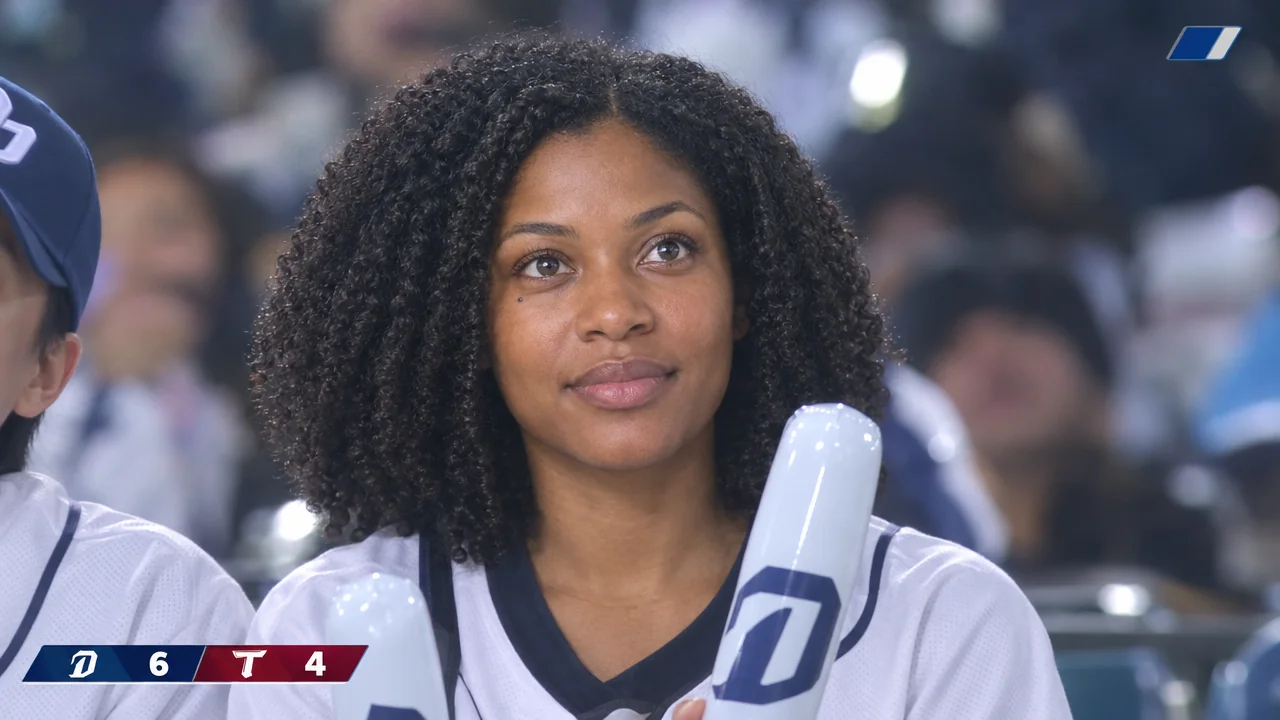
Turn the person in the reference image into a frame captured from a sports TV broadcast during a Korean baseball game. Match the reference face exactly: identical features and proportions from the original photo, with no drift in the bone structure or the colour of the eyes. Scene: the subject sits in the third row of the stand beside a friend whose shoulder and cap are just visible at the frame edge, both holding inflatable cheering sticks, looking up toward the jumbotron. Camera: broadcast long lens from the opposite stand, 300mm at f/4, tight medium shot, crowd behind compressed into soft colour bokeh, shallow focus with the subject's eyes sharp. Broadcast look: slightly low contrast with a faint green-cyan cast, highlights rolled off so the floodlights bloom a little, gentle live-TV softness, subtle noise in the shadows of the crowd. Overlay: a thin lower-third graphics bar in team colours containing only a two-digit score and a single short team abbreviation, plus one small corner bug shape with no readable text. Grade: cool floodlight white balance, warm skin, no saturated colour pop. No HDR, no extra text anywhere else in the frame.
Negative prompt
invented long text, wrong spellings, clean cinematic colour, HDR, empty stadium, distorted crowd faces, watermarks
Reference only — the image models available here do not take a separate negative prompt, so this list is guidance for editing the prompt above.
Why this works: The broadcast graphics variant. Shorter text is more reliable; always check the characters after generating, and switch to a plain coloured bar if they come out misspelled.
Jumbotron Cameo
The most eye-catching option, with the subject appearing on the stadium screen.
Nano Banana 2image → image4:5 · 2K
Reference photos: One front-facing portrait, used for the subject on the big screen; the same photo also provides the spectator silhouette in the foreground.
Stage the person in the reference image as a fan caught by the kiss-cam on a stadium jumbotron during a Korean baseball game. Two roles from one reference: show the same face sharp and centred on the large screen display, and show the back of the subject's head plus raised arms as a soft foreground silhouette in the lower right corner. Keep the facial identity on the screen exactly as in the reference. Display: the jumbotron screen occupies the upper two thirds of the frame, its image slightly cooler and more contrasty than the real scene, with faint LED grid texture and a subtle moire pattern across the large pixels; the crowd around it is dark. Scene: dense stands after sunset with floodlights on, cheering sticks glowing in the dark, one flare from a floodlight at the top left. Camera: 24mm from the stands below, tilted up, handheld, mild distortion. Light: bright screen glow spilling onto nearby fans, floodlight streaks, deep shadows elsewhere. Broadcast-night look with grain, mild bloom and slightly crushed blacks, no readable text on the screen besides the displayed image. No logos, no watermarks, no HDR.
Negative prompt
readable invented text, logos, watermarks, HDR, flat lighting, distorted hands, extra limbs, on-screen brand names
Reference only — the image models available here do not take a separate negative prompt, so this list is guidance for editing the prompt above.
Why this works: The most shareable variant. The screen-within-a-screen LED grid and the moiré pattern are the soul of it; if the portrait comes out smeared, delete the moiré sentence first.
Text-Only Stadium Sample
The page sample used when no suitable photo is available.
Nano Banana 2 Litetext → image16:9 · 1K
A generic long-lens catch from a live Korean baseball broadcast: a young adult in the stands turning toward the field mid-cheer, wearing a windbreaker in team colours with a paper cup of beer in one hand, cap pushed back, hair messy from the wind. Camera from the opposite stand with a 200mm lens at f/2.8: sharp face and eyes, rows of blurred fans in team colours behind, the pitch appearing as a soft green band at the far right, shallow depth of field throughout. Light: late afternoon floodlights mixing with daylight, slight top-down shadows under the brow, warm skin against a cool background. Broadcast look: slightly washed-out colour with a faint green cast, mild live-compression softness, faint sensor noise in the dark crowd, deep but open blacks. A thin graphics bar in team colours runs along the bottom edge with no readable text. No logos, no readable words anywhere in the image, no HDR.
Why this works: The text-only sample variant. It is the fallback for pages without a suitable photo; all text is required to be unreadable so that gibberish is avoided.