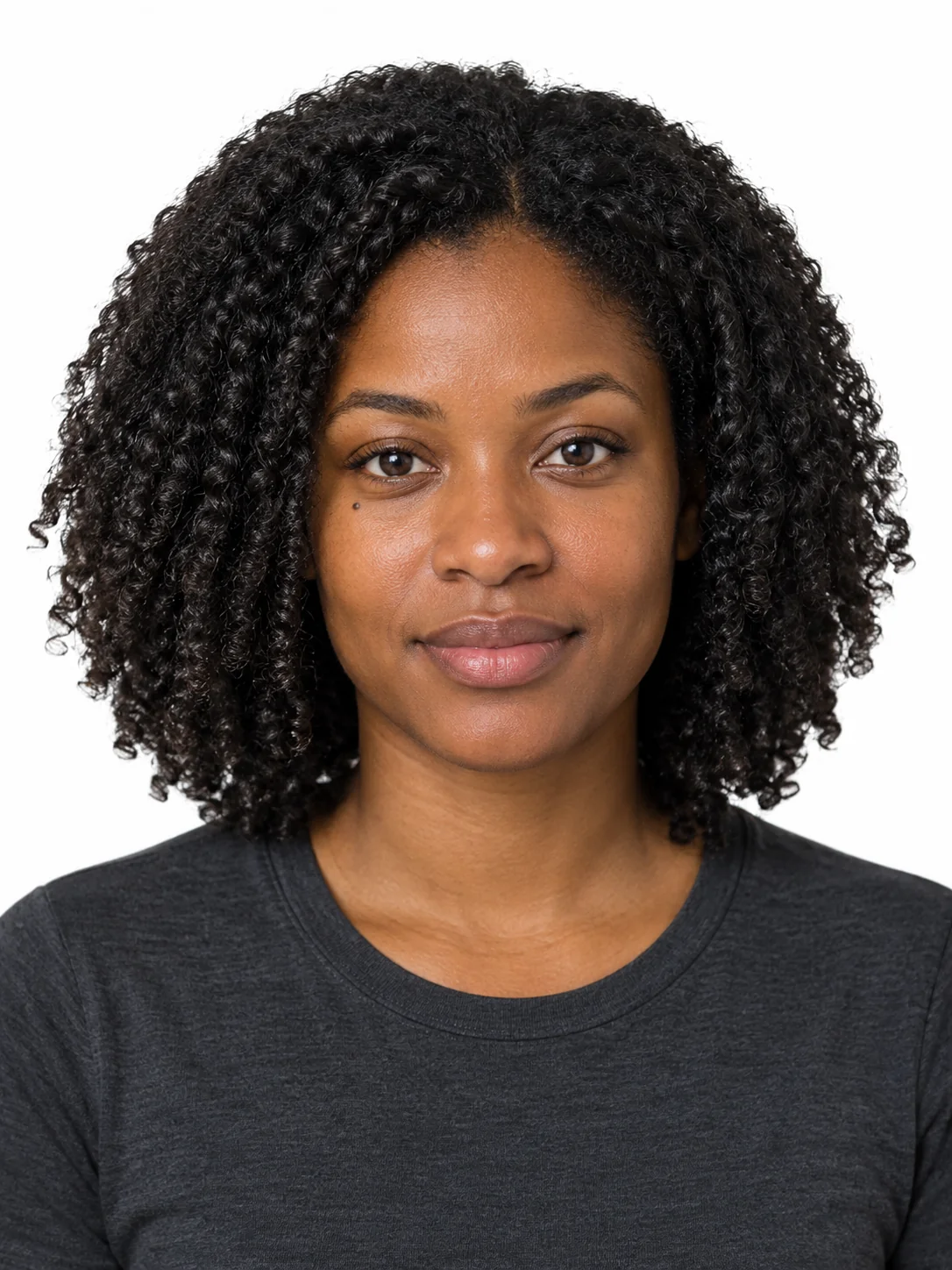
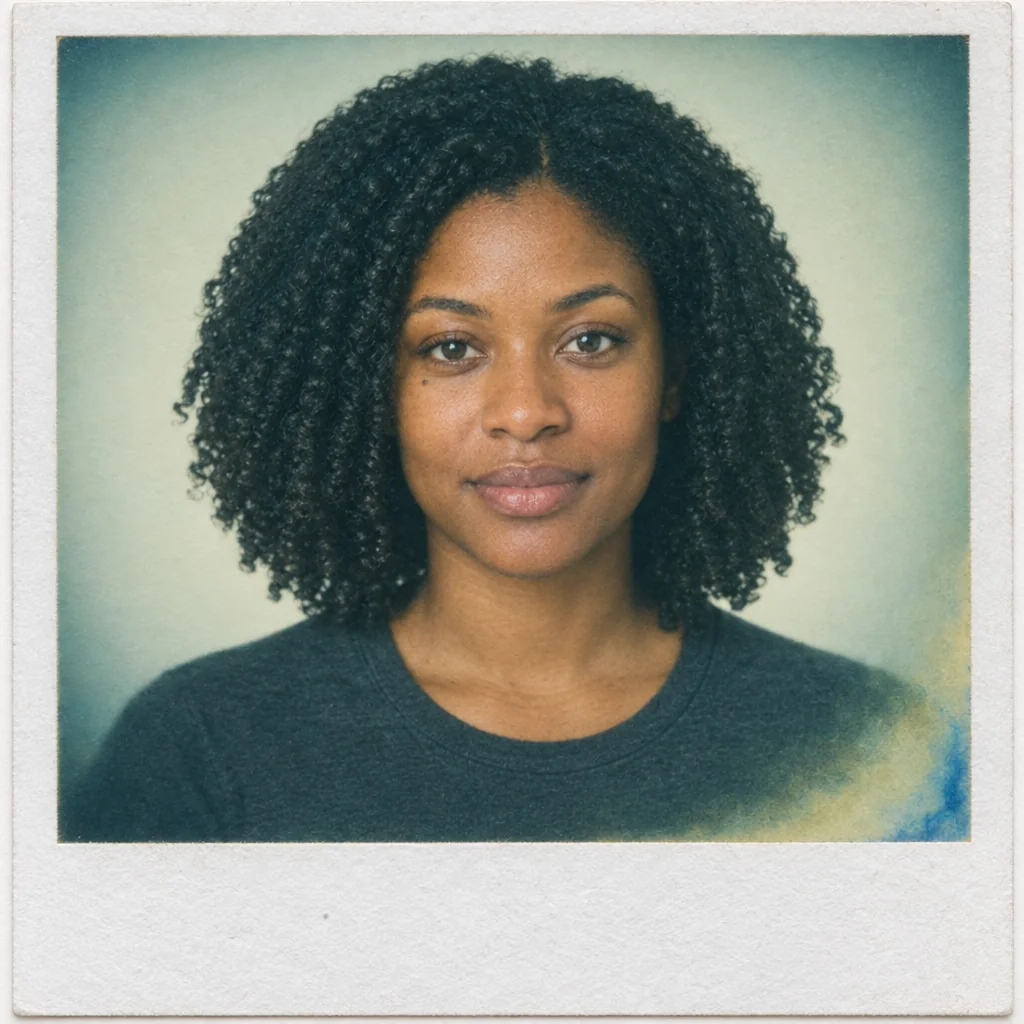
Each set is a complete prompt. Copy it, or open it in the studio with the model, aspect ratio and resolution it was written for.
Instant Square Chemical Print
For the most classic instant square frame with the white border.
Nano Banana 2image → image1:1 · 2K
Reference photos: One everyday photo, either a person or a still life. Do not use an image that already has a filter applied, or the colour shift will be doubled.
Turn the reference photo into a single instant-film print on a square frame. Keep the subject of the reference image unchanged in identity and composition; only the medium changes. Print characteristics: colour shifted to cool teal-green in the midtones with slightly yellowed highlights, uneven chemical development creeping in from the lower right edge, a faint blue chemical streak near the corner, mild vignette from the print edge, softness that increases toward the borders while the centre stays readable. Borders: a thin white frame on three sides and a wider empty white border along the bottom about one fifth of the frame height, with visible fibrous paper texture and one tiny dust speck. Surface: matte finish with a faint sheen where the light grazes the print, so it reads as a physical object rather than a digital file. No added noise filter, no fake scratches, no text.
Negative prompt
digital filter preset, uniform grain overlay, heavy scratches, neon colour, HDR, sharp digital edges, text, watermark
Reference only — the image models available here do not take a separate negative prompt, so this list is guidance for editing the prompt above.
Why this works: The base variant. If the whole image turns too green, replace 'cool teal-green' with 'slightly warm amber' and keep the uneven development sentence.
Held Photo Angles
For a print that reads as a physical object at a glance, with fingers, a table and surface sheen.
Nano Banana 2image → image4:5 · 2K
Reference photos: One portrait or party photo; the more everyday the original scene, the better it works as a physical print.
Show the reference photo as a physical instant print being held, photographed from above with a phone. The print sits slightly rotated on a wooden table, held by fingertips at the lower left and lower right corners only, with natural nails and a soft contact shadow under the paper. Print content: the original photo with instant-film colour, cool green shadows, warm highlights, mild chemical unevenness at one edge and a faint chemical streak, centre sharp and borders a little soft. Print body: white borders on all sides with the bottom one wider and empty, a light matte surface with a shallow sheen, one tiny corner bend and a faint fingerprint smudge on the border. Surroundings: a book edge, a half cup of coffee out of focus at the upper right, warm afternoon window light from the left with dust in the air. Framing: 4:5 vertical, print filling most of the frame but not touching the edges. Realistic, not a mockup template, no text overlays.
Negative prompt
digital mockup frame, perfectly flat print, glossy plastic surface, hard studio light, HDR, extra fingers, text, watermark
Reference only — the image models available here do not take a separate negative prompt, so this list is guidance for editing the prompt above.
Why this works: The physical feel depends on three things: fingertips, a contact shadow and clutter on the table. If the hands break down, keep only the fingertips and drop any mention of a whole hand.
Light Leak Film Frame
For still life or product shots that need a warm light leak and a stronger film character.
Seedream 5 Liteimage → image3:2 · 2K
Seedream 5 Lite does not offer 3:2 1K — this runs at 3:2 2K.
Reference photos: One still life, food or product photo; this variant runs warm and gives products a handmade feel.
Recreate the reference photo as a 35mm film frame with a strong warm light leak. Keep the subject, framing and colours of the reference image largely intact. Film treatment: amber-to-magenta light leak entering from the top right corner and fading across about a third of the frame, slight halation around bright highlights, gentle grain that is visible but does not dissolve detail, slightly lifted blacks with a warm cast, cool shadows in the lower left, faint scanner dust and two short hair-thin scratches. Exposure: feels half a stop overexposed near the leak with natural falloff toward the opposite corner. Framing: unchanged from the reference, no added vignette on top of the leak, no colour crush. The result should look like a real scan of a film photograph rather than a filter preset applied to a digital photo. No added noise, no text, no frame borders.
Negative prompt
digital noise, uniform grain, crushed shadows, colour banding, overloaded leak covering the whole frame, text, watermark
Reference only — the image models available here do not take a separate negative prompt, so this list is guidance for editing the prompt above.
Why this works: The product and still life variant. Keep the light leak in one corner only instead of across the whole frame, because covering the frame turns it into a cheap filter.
Text-Only Instant Sample
The page sample used when there is no reference image.
GPT Image 2text → image1:1 · 1K
A single instant-film print of an ordinary domestic still life: a table with a half-drunk cup of coffee, a folded newspaper, a pair of reading glasses and a small vase with one dried flower, photographed in soft morning window light from the left. Instant-film look: cool teal-green midtones, slightly yellowed highlights, uneven chemical development creeping in from the lower right, a faint blue chemical streak near one corner, centre sharp with softer borders, gentle print-edge vignette. Print body: thin white borders on three sides with a wider empty border along the bottom, visible fibrous paper texture, matte finish with a shallow sheen, one tiny dust speck on the paper. The image should read as a physical print of a real scene, not a digital filter. No text, no handwriting, no scratches, no decorative props.
Why this works: The text-only sample variant, with no reference image. It is the fallback for pages where the material is not decided yet; when a real photo is available, use the first three prompts.